- Double the quotes (""):MsgBox "#1: ""QTP - QuickTest Professional"""Use 2 double quotation marks to include a quote character in the string.
So, the result is: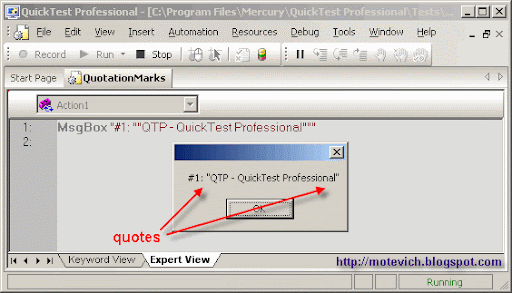
- Use ANSI character code - Chr(34):MsgBox "#2: " & Chr(34) & "QTP - QuickTest Professional" & Chr(34)Since, the ANSI code if quotation mark = 34, we can use Chr function.
The result is: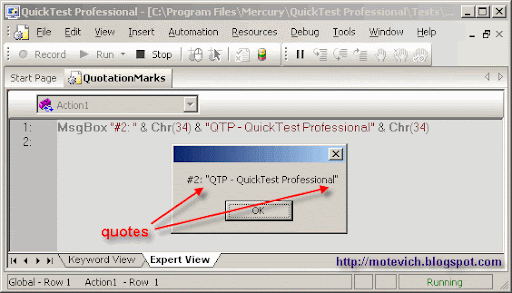
Showing posts with label QTP - VBScript. Show all posts
Showing posts with label QTP - VBScript. Show all posts
Wednesday, 6 April 2011
quotes in VBScript
There two ways to do that:

Saturday, 2 April 2011
VBScript - Are you sure 1+1=2?
QTP VBScript contains different niceties. This article shows that 1 + 1 doesn't equal 2 sometimes.
Well, I've prepared this QTP script:
I will explain it step by step and show all entered data and generated result.
Do you know why it is so? What is a reason?
The answer is simple. This is due to converting of VBScript types.
After you read first number (1) from user and assign it (value of course value, not user :) ) to variable, this variable has value of String type.
So, this is the same like n1 = "1"
When VBScript executes this line:
Then VBScript calculates n1 + 1 and the result (2) has a numeric type - Double (special double-precision floating-point value).
Here is the main point! 2 as Number is not the same as 2 as String. These values have different type and that's why they differ.
Simple visual example - two apples are not equal to two pears :)
I can demonstrate the above types converting.
I've added this code into our QTP script before if-then-else:
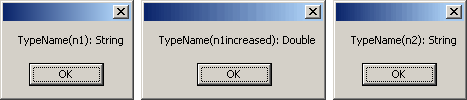 That's why the value of number variable is not equal to the value of string variable.
Well, How to make that 1 + 1 = 2 ?
Answer: Convert string value to number with CInt function:
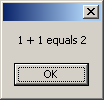 It works. It works correctly :)
I hope, you will keep in mind this issue with VBScript types converting. It can save your time during debugging of QTP scripts.
Source
| Exactly, 1 + 1 doesn't equal 2 sometimes. |
Well, I've prepared this QTP script:
n1 = InputBox("Enter first number")
n2 = InputBox("Enter second number")
n1increased = n1 + 1
If n1increased = n2 Then
MsgBox n1 & " + 1 equals " & n2
Else
MsgBox n1 & " + 1 doesn't equal " & n2
End If
n2 = InputBox("Enter second number")
n1increased = n1 + 1
If n1increased = n2 Then
MsgBox n1 & " + 1 equals " & n2
Else
MsgBox n1 & " + 1 doesn't equal " & n2
End If
I will explain it step by step and show all entered data and generated result.
- Read first number from user's input
I enter 1 as a first number: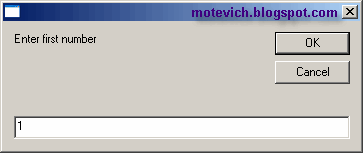
- Read second number from user's input
I enter 2 as a second number: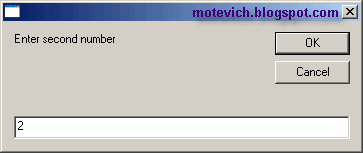
- Increase first number by 1n1increased = n1 + 1
- Check whether first increased number equals to second numberIf n1increased = n2 ThenAnd the result is:
MsgBox n1 & " + 1 equals " & n2
Else
MsgBox n1 & " + 1 doesn't equal " & n2
End If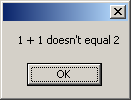
Do you know why it is so? What is a reason?
The answer is simple. This is due to converting of VBScript types.
After you read first number (1) from user and assign it (value of course value, not user :) ) to variable, this variable has value of String type.
So, this is the same like n1 = "1"
When VBScript executes this line:
n1increased = n1 + 1
it sees, that we perform mathematical operation and converts n1 into number.Then VBScript calculates n1 + 1 and the result (2) has a numeric type - Double (special double-precision floating-point value).
Here is the main point! 2 as Number is not the same as 2 as String. These values have different type and that's why they differ.
Simple visual example - two apples are not equal to two pears :)
I can demonstrate the above types converting.
I've added this code into our QTP script before if-then-else:
MsgBox "TypeName(n1): " & TypeName(n1)
MsgBox "TypeName(n1increased): " & TypeName(n1increased)
MsgBox "TypeName(n2): " & TypeName(n2)
And its result is:MsgBox "TypeName(n1increased): " & TypeName(n1increased)
MsgBox "TypeName(n2): " & TypeName(n2)
 That's why the value of number variable is not equal to the value of string variable.
Well, How to make that 1 + 1 = 2 ?
Answer: Convert string value to number with CInt function:
If n1increased = CInt(n2) Then
MsgBox n1 & " + 1 equals " & n2
Else
MsgBox n1 & " + 1 doesn't equal " & n2
End If
And the result is:MsgBox n1 & " + 1 equals " & n2
Else
MsgBox n1 & " + 1 doesn't equal " & n2
End If
 It works. It works correctly :)
I hope, you will keep in mind this issue with VBScript types converting. It can save your time during debugging of QTP scripts.
Source
Subscribe to:
Posts (Atom)
Search

Custom Search

